

These guides support organizations that already operate a self-hosted data plane. For new organizations looking to keep data in your own cloud, see Bring your own cloud (BYOC).
Client routing
Configure API URLs
Your organization’s API URLs tell Braintrust where to reach your data plane. To connect a new deployment for the first time, follow the “Configure your organization” step in Deploy Braintrust.Configuring data plane URLs is only available on the Enterprise plan.
- Go to Settings > Data plane.
-
Enter your data plane’s API URL. For new configurations, Braintrust sends AI proxy traffic to
<API URL>/v1/proxy. If your organization already has a custom proxy URL saved, the dialog also shows Use a custom proxy URL. If it has a custom realtime URL saved, the dialog shows Advanced > Custom realtime URL. Changing the API URL doesn’t clear either value. - If your data plane is deployed behind a VPN or on a private network (not accessible from the public internet), enable Data plane is on a private network. This checkbox enables detection of Chrome Local Network Access permission issues. When enabled, if fetch requests fail due to blocked LNA permissions, Braintrust will display instructions on how to grant the necessary permissions in Chrome settings.
- Click Save.
Customize the webapp URL
The SDKs guide users tohttps://www.braintrust.dev (or the BRAINTRUST_APP_URL variable) to view their experiments. In some
advanced configurations, you can reverse proxy traffic to the BRAINTRUST_APP_URL from the SDKs while pointing users to a different URL.
To do this, you can set the BRAINTRUST_APP_PUBLIC_URL environment variable to the URL of your webapp. By default, this variable is set to the value of BRAINTRUST_APP_URL, but you can customize it as you wish. This variable is only used to display information, so even its destination does not need to be accessible from the SDK.
- AWS
- GCP / Azure
Set it through the Deployments still served by the API Lambda (before module v6.0.0, or v6.0.0 and later with
braintrust_api_extra_env_vars passthrough map (Terraform module v6.0.0 or later):enable_ecs_api = false) set the same variable through service_extra_env_vars.APIHandler instead.Constrain SDKs to the data plane
If you’re self-hosting the data plane, you can also constrain the SDKs to only communicate with your data plane. Normally, they communicate with the control plane to:- Get your data plane’s URL
- Register and retrieve metadata (e.g. about experiments)
- Print URLs to the webapp
BRAINTRUST_APP_URL environment variable to the URL of your data plane and BRAINTRUST_APP_PUBLIC_URL to https://www.braintrust.dev (or the URL of your webapp).
- AWS
- GCP / Azure
Inbound traffic
Set HTTPS on the API load balancer
On AWS with the ECS API, an internal Application Load Balancer (ALB) fronts the API services. CloudFront terminates TLS for inbound traffic and reaches this ALB over a private VPC origin, so the ALB does not need its own certificate in a standard deployment. By default, the ALB serves plain HTTP on port 80 using its AWS-assigned DNS name. To serve HTTPS on a custom domain instead, set bothbraintrust_api_alb_certificate_arn and braintrust_api_alb_custom_domain (available in Terraform module v6.0.0 or later):
https://<braintrust_api_alb_custom_domain>. The certificate must cover the custom domain, and the domain must resolve to the ALB.
These two variables must both be set or both be null. Setting only one fails at plan time.
Run a private data plane
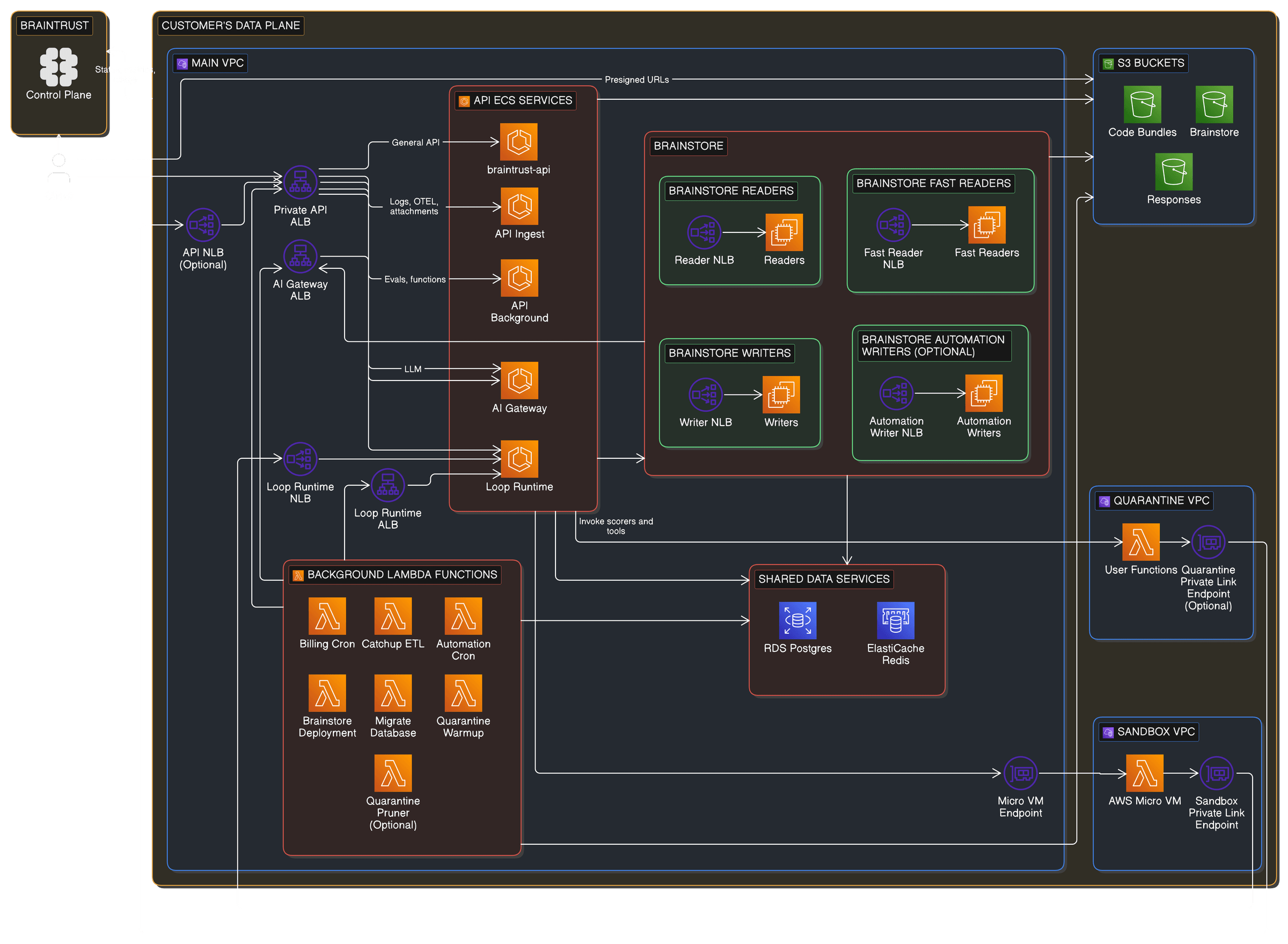
In private mode, an AWS data plane exposes its API through an internal Application Load Balancer (ALB). The ALB serves all customer traffic on your own hostname, without CloudFront or API Gateway. Clients reach the data plane only over your private network. Private mode requires Terraform module v7.2.0 or later. A public data plane, which serves the API through CloudFront, remains simpler to deploy and operate.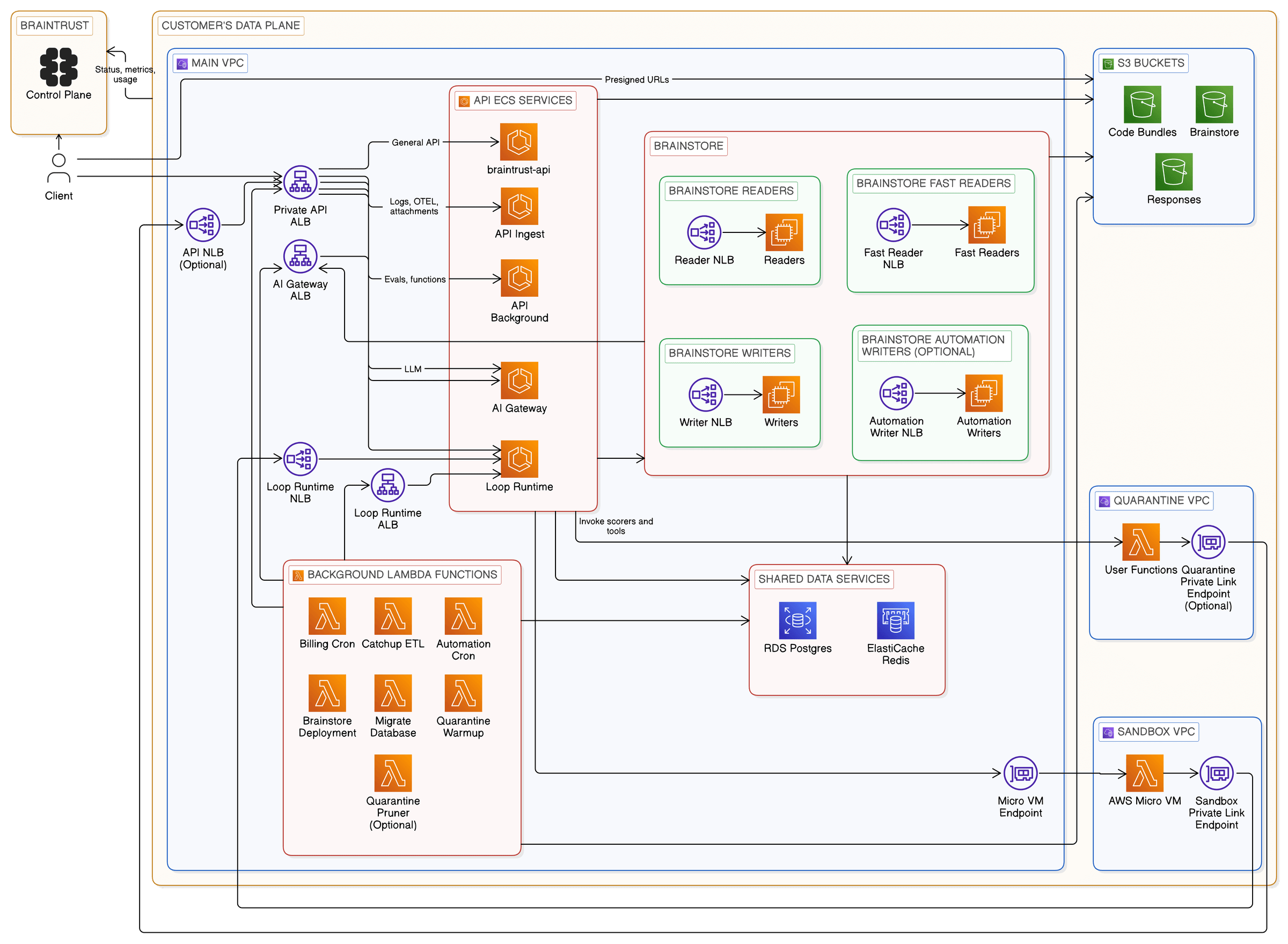
1
Prepare for private mode
Set up connectivity between your client networks and the data plane. The Terraform module doesn’t provision these network resources, so use an appropriate option:
- AWS Transit Gateway
- VPC peering
- AWS PrivateLink
- VPN
- An API hostname under a domain you control.
- An ACM certificate for that hostname in the deployment account and region, issued by a certificate authority that every client trusts.
- DNS that resolves the hostname to the internal ALB from every client network. The module doesn’t create the DNS record.
- Outbound access from the data plane to Braintrust, AWS services, and model providers.
2
Set the Terraform variables and apply
Private mode requires the ECS API and the Gateway, and it doesn’t support external EKS mode or the hosted Gateway (By default, user-defined functions in the quarantine VPC can’t reach the API or Gateway in private mode, and no public fallback applies. To give them access, also set
The module creates a PrivateLink path from the quarantine VPC to the API ALB’s internal listener and configures the API to use that endpoint for both API and Gateway requests. Only the quarantine Lambda security group can use the endpoint, and requests still require user authentication. Then run
use_global_ai_proxy and use_global_ai_gateway_origin). It also rejects quarantine_proxy_url and the CloudFront inputs custom_domain, custom_certificate_arn, and waf_acl_id.Set these variables in main.tf:create_quarantine_api_access = true, which requires enable_quarantine_vpc.Give quarantine functions access to the API
Give quarantine functions access to the API
use_private_gateway_quarantine_proxy has no effect in private mode, and public deployments ignore create_quarantine_api_access. The network load balancer and interface endpoint are billed separately.terraform apply.3
Create a DNS record
Create a DNS record for your API hostname that points to the DNS name of the internal ALB, named
<deployment_name>-api-ecs. Route 53 supports an alias A record. Other DNS providers can use a CNAME below the zone apex. A public DNS record for the internal ALB still resolves to private IP addresses.4
Verify connectivity
Verify DNS resolution and HTTPS access from each client network. Security group rules alone don’t establish network connectivity.
5
Get the API URL
Run
terraform output -raw api_url, which returns https://<braintrust_api_alb_custom_domain>.6
Configure your organization
Go to Settings > Data plane, set API URL to the URL from the previous step, enable Data plane is on a private network, and save. See Grant browser permissions.
7
Configure your SDKs
Configure your SDKs with the same API URL.
/v1/proxy) and, with the Loop runtime enabled, Loop requests (/loop/runtime) directly to those services. Data plane services call the API on an internal HTTP listener on port 8000, reported by the api_ecs_internal_url output.
Set the HTTP keep-alive timeout
When the API server runs behind a load balancer, you may need to configure the HTTP keep-alive timeout to prevent connection resets. Load balancers typically have an idle timeout for connections, and if the API server’s keep-alive timeout is shorter than the load balancer’s timeout, the API server closes the connection while the load balancer still considers it open. When the load balancer tries to reuse that backend connection, it encounters a closed socket, resulting in connection reset errors and 502 responses. The API server exposes the following environment variable to configure the keep-alive timeout:TS_API_KEEP_ALIVE_TIMEOUT_SECONDS: The HTTP keep-alive timeout in seconds. Default:65
- AWS
- GCP / Azure
Set it through the
braintrust_api_extra_env_vars passthrough map (Terraform module v6.0.0 or later). This applies to the ECS API services:Set the CloudFront origin timeout
On AWS, requests are served through CloudFront, which closes a connection and returns504 Gateway Timeout if the origin takes too long to respond. Long-running scorers or tools invoked through /function/invoke can exceed the default 60-second origin read timeout. Raise it with the cloudfront_origin_read_timeout Terraform variable (available in Terraform module v5.3.0 or later):
Set the CloudFront minimum TLS version
On AWS deployments that supply a custom certificate throughcustom_certificate_arn, CloudFront negotiates a minimum TLS version of TLSv1.3_2025 with viewers. To support clients that cannot negotiate TLS 1.3, lower the floor with the cloudfront_minimum_protocol_version Terraform variable (available in Terraform module v6.5.2 or later):
TLSv1, TLSv1_2016, TLSv1.1_2016, TLSv1.2_2018, TLSv1.2_2019, TLSv1.2_2021, and TLSv1.3_2025. The setting applies to the whole distribution. Leave it unset to keep the TLSv1.3_2025 default.
Set
cloudfront_minimum_protocol_version only alongside custom_certificate_arn. Terraform rejects the configuration otherwise, because CloudFront cannot set a minimum protocol version on the default certificate.Set inbound request rate limits
The API server can rate-limit log ingestion, SQL queries, and function invocation. Configure each surface separately with its own environment variables for limits, window length, and enforcement. All three surfaces behave the same way in these respects:- Windows: Each limit uses a fixed window that starts when the first matching request is counted, not on a clock boundary. The counter resets after the configured number of seconds, and the next matching request starts a new window. Rejected requests still count toward the limit.
- Enforcement: With enforcement disabled, requests over a limit are allowed and the API server logs a warning. With enforcement enabled, they fail with HTTP 429 and a
Retry-Afterheader, and the response body reports the configured limit, the window length, and the requests consumed. A limit of0is a real zero-request limit, so with enforcement enabled every matching request is rejected. - Replicas: Each limit applies across all API server replicas combined.
- Restarts: Rate limit configuration is read once at process start. Restart or redeploy the API services after changing any of these variables.
None of these variables has a dedicated Terraform variable or Helm value, so pass them through your deployment’s environment variable map, as shown in the examples below. Variables that take
<id>=<max_requests> pairs accept a comma-separated list of pairs.Limit log ingestion
Log ingestion limits apply per organization and per project, and both are disabled by default. A project limit replaces the organization limit rather than adding to it, so a project with its own entry ignores the organization limit entirely. With no limit configured, ingestion is uncapped. Window and enforcementRATELIMIT_API_LOGS_ORG_WINDOW_SECS: Window length in seconds. Default60. Despite the name, this also sets the window for project-based limits.RATELIMIT_API_LOGS_ORG_ENFORCE: Return HTTP 429 when a limit is exceeded. Defaultfalse(log a warning and allow the request). Despite the name, this also governs the enforcement of project-based limits.
RATELIMIT_API_LOGS_ORG: Per-organization limits, as<org_id>=<max_requests>pairs. Find an organization’s ID in the organization switcher.
Project-scoped limits require data plane v2.2.1 or later.
RATELIMIT_API_LOGS_PROJECT: Per-project limits, as<project_id>=<max_requests>pairs. Find a project’s ID under Settings > Project.RATELIMIT_API_LOGS_PROJECT_DEFAULT: Limit for every project without an entry inRATELIMIT_API_LOGS_PROJECT. Set it only if you want every project capped.
- AWS
- GCP / Azure
Set these variables through the Deployments still served by the API Lambda (before module v6.0.0, or v6.0.0 and later with
braintrust_api_extra_env_vars passthrough map (Terraform module v6.0.0 or later). For example:enable_ecs_api = false) set the same variables through service_extra_env_vars.APIHandler instead.Limit SQL queries
SQL query limits apply per organization and per project, and both are disabled by default. A project limit adds to the organization limit rather than replacing it, so it can only tighten the effective limit. Organizations without their own entry fall back toRATELIMIT_BTQL_DEFAULT, and with no default configured, queries are uncapped.
Each async query submission (POST /btql/async) counts as one query toward these limits. Requests to check an async query’s status, fetch its results, or cancel it don’t count.
Window and enforcement
RATELIMIT_BTQL_WINDOW_SECS: Window length in seconds. Default60.RATELIMIT_BTQL_ENFORCE: Return HTTP 429 when a limit is exceeded. Defaultfalse(log a warning and allow the query).
RATELIMIT_BTQL_ORG: Per-organization limits, as<org_id>=<max_queries>pairs. Find an organization’s ID in the organization switcher.RATELIMIT_BTQL_DEFAULT: Limit for every organization without an entry inRATELIMIT_BTQL_ORG.RATELIMIT_BTQL_DEFAULT_FUNCTIONS: Separate default for queries against prompts and functions. Defaults to 20 timesRATELIMIT_BTQL_DEFAULT, including when set to-1.
Project-scoped limits require data plane v2.2.1 or later.
RATELIMIT_BTQL_PROJECT: Per-project limits, as<project_id>=<max_queries>pairs. Setting one above the organization limit has no effect. With no organization limit configured, the project limit is the only one that applies. Find a project’s ID under Settings > Project.
- AWS
- GCP / Azure
Set these variables through the Deployments still served by the API Lambda (before module v6.0.0, or v6.0.0 and later with
braintrust_api_extra_env_vars passthrough map (Terraform module v6.0.0 or later). For example:enable_ecs_api = false) set the same variables through service_extra_env_vars.APIHandler instead.These limits apply to queries from the API, the SDKs, and the MCP server. Queries issued from the Braintrust UI are exempt.
Limit function invocation
Invocation limits cover a project’s prompts, scorers, tools, and other custom code functions. They are project-scoped, and there is no organization-scoped limit. Two independent limits apply: a per-project limit that is disabled by default, and a per-function cap that is on by default with a fixed 10-second window and always returns HTTP 429. Window and enforcementRATELIMIT_INVOKE_WINDOW_SECS: Window length in seconds for the project limits. Default10. It does not affect the per-function cap.RATELIMIT_INVOKE_ENFORCE: Return HTTP 429 when a project limit is exceeded. Defaultfalse(log a warning and allow the invocation). It does not affect the per-function cap.
Project-scoped limits require data plane v2.2.1 or later.
RATELIMIT_INVOKE_PROJECT: Per-project limits, as<project_id>=<max_invocations>pairs. The count covers every function in the project, across all API keys. Find a project’s ID under Settings > Project.RATELIMIT_INVOKE_PROJECT_DEFAULT: Limit for every project without an entry inRATELIMIT_INVOKE_PROJECT. Set it only if you want every project capped.
INVOKE_RATE_LIMIT_PER_10S: Maximum invocations per function, per API key, in a 10-second window. Default10000. The count is per function, not per project.ENABLE_INVOKE_RATE_LIMIT: Whether invocation rate limiting runs at all. Defaulttrue. Setting it tofalseturns off the per-function cap and the project limits.
- AWS
- GCP / Azure
Set these variables through the Deployments still served by the API Lambda (before module v6.0.0, or v6.0.0 and later with
braintrust_api_extra_env_vars passthrough map (Terraform module v6.0.0 or later). For example:enable_ecs_api = false) set the same variables through service_extra_env_vars.APIHandler instead.Preprocessors are exempt from invocation rate limits.
Outbound traffic
Secure outbound requests
The data plane makes outbound requests both to Braintrust and to URLs you or your users supply, such as webhooks, remote scorers, and integrations. Allow traffic to Braintrust through your firewall If you restrict outbound network traffic, allow the data plane to reach Braintrust at:gateway.braintrust.dev is the Braintrust-hosted Gateway. Two kinds of request go there:
- Built-in model requests. Braintrust serves built-in models itself, so requests for them always go to the hosted Gateway. Self-hosted organizations have built-in models off by default and opt in explicitly, and Topics requires them.
- LLM calls from user-authored code, such as custom scorers and tools, on AWS deployments that run the API on ECS (
enable_ecs_api = true) with Terraform module v6.4.0 or earlier. Module v6.5.0 and later sends these to the deployment’s own AI proxy instead, so that traffic stays in your AWS account.
pulse.braintrust.dev receives the telemetry your data plane sends to Braintrust.
This is firewall guidance. The data plane does not enforce a destination allowlist itself.
Block requests to internal addresses
To stop user-supplied URLs from reaching private or reserved IP addresses (server-side request forgery), configure URL validation. See Configure URL security.
Trust a private certificate authority
If the internal services your custom scorers and tools call present certificates signed by a private or enterprise certificate authority, supply the CA bundle so those requests validate. See Configure a custom CA bundle.
Set outbound request rate limits
The Braintrust API server can rate-limit the outbound requests it makes to external domains, such asBRAINTRUST_APP_URL. Rate limiting prevents unintentionally overloading an external domain, which might otherwise block the API server’s IP in response. It is disabled by default. When enabled, requests are counted per API auth token per destination domain within a rolling window.
OUTBOUND_RATE_LIMIT_MAX_REQUESTS: The maximum number of requests per window. Default0, which disables rate limiting. Set a value greater than0to enable it.OUTBOUND_RATE_LIMIT_WINDOW_MINUTES: The window length in minutes before the count resets. Default1.
- AWS
- GCP / Azure
Use the dedicated variables (Terraform module v1.0.0 or later):
Allow the custom view sandbox domain
If you restrict outbound access, allowlisthttps://www.braintrustsandbox.dev to enable custom views. This domain hosts the sandboxed iframe that renders custom view code.
Connect to internal resources over VPC
On AWS, to connect Braintrust’s VPC to other internal resources (like an LLM Gateway), use one of the following approaches:- Create a VPC Endpoint Service for your internal resource, then create a VPC Interface Endpoint inside the Braintrust “Quarantine” VPC.
- Set up VPC peering with the Braintrust “Quarantine” VPC.
AWS service VPC endpoints
The module creates AWS service VPC endpoints in VPCs it manages. Interface endpoints span all three private subnets and share a security group that allows HTTPS (TCP 443) from the VPC CIDR. Interface endpoint charges apply.
The SSM and Secrets Manager variables have no effect when
create_vpc = false. The module doesn’t create interface endpoints in the quarantine VPC or in VPCs you supply.
Provide your own SSM connectivity
Provide your own SSM connectivity
On Terraform module v6.9.0 and later, you can keep Brainstore SSM access but skip the module’s three SSM endpoints (Brainstore’s SSM IAM permissions don’t change. Provide reachable endpoints, including DNS and security groups, or outbound HTTPS access to SSM.
ssm, ssmmessages, and ec2messages):Opt out of the Secrets Manager endpoint
Opt out of the Secrets Manager endpoint
On Terraform module v6.8.1 and later, the module creates a Secrets Manager endpoint by default in a module-managed main VPC, and upgrading an existing module-managed VPC adds it. Private DNS redirects the standard regional Secrets Manager hostname through the endpoint, so existing SDK and CLI calls use it without URL changes. To skip it:
Braintrust Gateway
To deploy the Gateway, configure its API endpoint, or route quarantine traffic through PrivateLink, see Self-host the Braintrust Gateway.See also
Releases and availability- Self-hosting releases: Review release notes and the minimum Terraform or Helm version for each data plane version.
- Feature availability: Find the data plane version each feature requires and which features each cloud supports.
- Architecture: Understand the control plane, data plane, and where data is stored.
- Deploy Braintrust: Deploy the data plane on AWS, GCP, or Azure.
- CloudFormation: Manage a legacy AWS CloudFormation deployment.
- Configure your deployment: Review the settings available after deployment.
- Security and access: Restrict organization access, secure customer data, and harden pods.
- Networking and connectivity: Configure URLs, rate limits, load balancers, and network access paths.
- Scaling and storage: Size API and Brainstore compute.
- Self-host the Braintrust Gateway: Deploy the Gateway in your data plane.
- Loop runtime: Run Loop threads in isolated sandboxes on AWS or GCP.
- Telemetry and data retention: Control telemetry and enable data retention.
- Upgrade your deployment: Follow the routine upgrade process.
- Upgrade to data plane v2.x: Migrate to the data plane v2 series.
- Upgrade to Terraform module v6: Move AWS API traffic from Lambda to ECS.
- Upgrade to Terraform module v7: Route AWS API traffic to ECS and deploy the Gateway by default.